
To send move-in photos to your landlord, confirm the accepted channel and any required form, prepare a focused copy with a short photo index, and check that the intended recipient can open it. Keep your unedited originals separately. After sending, save the exact message or portal submission, the files it contained and any actual acknowledgment.
Taking the photos and transmitting them are different jobs. An organized private album does not tell management which room a close-up shows. A cloud folder that opens for you may still be locked for the recipient. A message in Sent does not establish that someone read it or agreed with your descriptions.
Use our original pre-send checklist and cover-note template with the packet/photo index and delivery log. These downloads help you prepare and record your own transmission; they do not send anything.

Confirm the channel before preparing a packet
Read the move-in instructions and the relevant tenancy documents you have. Look for a condition form, a named recipient, a portal category, accepted file formats and any applicable submission process. Ask for clarification if the instructions conflict. Do not assume that emailing an address from an old listing meets the process for your tenancy.
Check the recipient carefully, especially when an apartment has changed management or several staff share a name. Use the verified management contact you normally use. If a supplied form is required, connect the photo packet to that form rather than quietly replacing it with an album link.
This guide does not set a nationwide deadline or establish that an email is legally sufficient notice. It explains the practical transfer after you have photographs. For capture coverage and spot descriptions, use the move-in photo checklist.
Prepare sharing copies and keep your originals
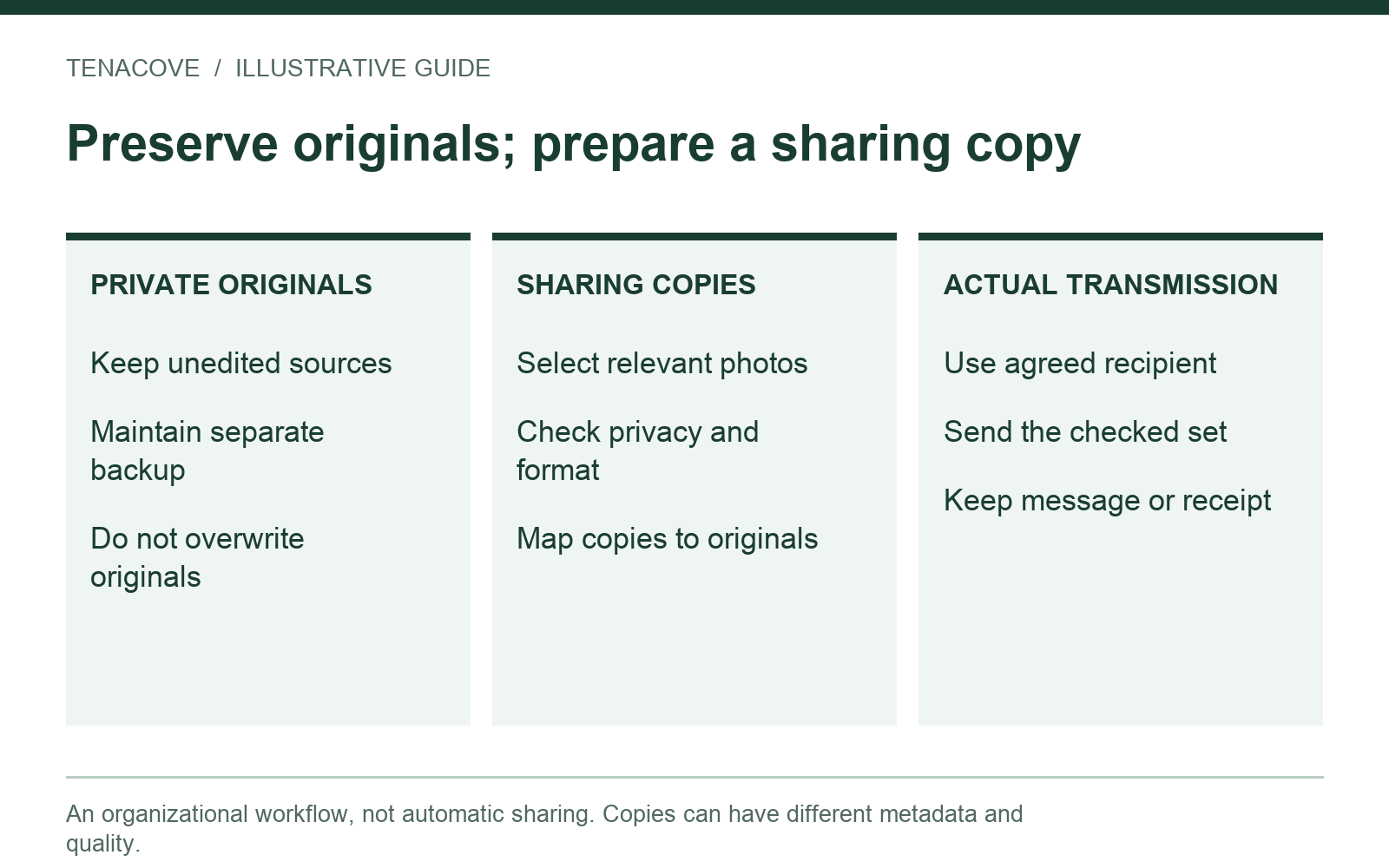
Create a separate folder for this packet. Include only the photos needed to explain the conditions you are reporting, with a short index. Preserve the original files in your private archive and a separate backup. Do not drag your entire camera roll into an outgoing message just because it is convenient.
A useful packet pairs a context photo with a relevant detail and maps both to an issue or room label. For example, K-01-A might show the kitchen counter's location and K-01-B a visible mark. Keep the actual source filenames in your index. If delivery copies are renamed, record that mapping rather than losing the relationship.
Check format and size on the actual channel
Open the files you intend to send. A format that previews on your phone may not preview in the recipient's portal or browser. If a compatible copy is needed, make one without replacing the source, label it clearly and check that the important detail remains readable. Do not describe a screenshot or converted copy as the untouched original.
Check the total packet size and the channel's current limits. For example, Google's Gmail attachment guidance lists a 25 MB limit for personal accounts and says work or school limits depend on the administrator. It also explains that an over-limit attachment set may become a Drive link. That example is not a limit for every landlord, email service or portal. Review what the draft actually contains before sending.
If you need to split a packet, keep the issue IDs consistent and label the parts plainly, such as “Move-in condition packet, part 1 of 2.” Keep a list of which files went in each part. Ask about an accepted alternative rather than removing useful detail until the photographs become unreadable.
Choose attachments, a portal or a private link
| Method | Before sending | Keep afterward |
|---|---|---|
| Email attachments | Correct address; completed uploads; expected file names and readable copies | Actual sent message and exact attachments; any bounce or reply |
| Management portal | Correct unit/category; accepted formats; completed upload and submit step | Submission copy, reference or confirmation actually offered; exact files |
| Private cloud link | Specific recipient access; minimum useful permission; correct folder contents | Sent link/message, packet snapshot and any actual access-related response |
A portal may distinguish Save draft from Submit. Check the actual interface rather than assuming that an upload completed the submission. Preserve the confirmation it actually provides. If it offers no downloadable copy, record the reference and relevant submission details you can retain without including unrelated private information.
For a cloud link, use a dedicated packet folder. Avoid a folder that also contains identity documents, personal photos or unrelated tenancies. Permissions can apply to the folder's contents, so review the container as well as each file.
Google Drive's official sharing guide distinguishes Viewer, Commenter and Editor access, explains folder permission inheritance, and describes Restricted access for specifically permitted people. If you use Drive, choose the least access needed for the agreed task. Do not make a private rental packet public merely to bypass an access problem. Other providers have different controls; inspect the settings you actually use.
Check private details and recipient access
Review visible content before checking metadata: faces, mail, medication labels, account screens, access codes and reflections may reveal more than the room condition. Select another useful view if possible. If you redact or crop a delivery copy, label that alteration and preserve the original privately. Do not hide the condition you are describing.
Location information can also travel with a photo. Apple's location-metadata guide explains reviewing it and turning off Location in Photos sharing options. If that fits your device and sharing method, apply it to the intended sharing copies, then check the outgoing result. It does not guarantee that every other identifying detail is removed, or that all apps export the same way.

For restricted links, your owner's view is not a recipient test. Confirm that the intended address has access and ask the recipient to confirm they can open the files when practical. If you use a separate test account you control, remember that it checks only that account's access. A signed-out test can reveal whether a link is public, but failure while signed out is expected for a properly restricted folder.
Open both a preview and a download where the intended permissions allow them. Record limitations rather than weakening privacy by default. The Tenacove privacy page explains the separate privacy and metadata considerations for records stored in the app; it does not control an external folder's sharing permissions.
Watch on YouTube ↗
Write a short cover note and an index
Keep the message focused on the move-in record and any actual clarification you need. Put the unit or agreed property identifier, observation date and packet name near the start. Explain whether the packet records existing condition, requests a repair or both. If you are reporting several observations, make it easy to connect the text to the files.
Here is an original cover-note example. Replace every bracketed field and remove statements that do not match your situation:
Subject: Move-in condition photos — [unit / agreed identifier] — [actual observation date]
Hello [management contact], I am sending [packet name/version] documenting observations made on [actual date]. The index connects each observation to its photos. [Describe how the files are attached or the agreed private link.] Please let me know if a file cannot be opened or if another submission format is needed. [List any specific clarification or repair request, or state that this message records condition only.] Thank you, [name].
For a repair request, include the relevant issue and requested next step. Do not let “photos attached” become the entire explanation. The packet should remain readable even if management first views only the email text.
| Packet field | Fictional example | What it clarifies |
|---|---|---|
| Name / version | Unit-example-move-in-v1 | Which prepared set the message refers to |
| Observation / copies | K-01 counter mark; K-01-A.jpg context; K-01-B.jpg detail | Which files explain that observation |
| Source mapping | K-01-A.jpg copy of IMG_5201.JPG | Where the untouched source is retained privately |
| Transmission | Not sent — enter actual channel/date only afterward | Distinguishes a prepared packet from a submission |
| Response | No acknowledgment recorded | Does not invent receipt or agreement |
This example is fictional. In your real index, avoid including a private storage path or unrelated personal detail that the recipient does not need. Check that all listed files are actually included and no extra files slipped into the packet.
Keep the exact sent version and actual replies
After sending, save the message or submission record and the same packet files. A folder that you edit later is not a frozen copy of what the original link exposed. Keep a dated local snapshot or version record of the packet's actual contents, and note any later additions explicitly.
Record the actual date, channel, recipient, packet version and reference number if one exists. Preserve a bounce, access error or reply rather than recording every attempted send as successful delivery. An automated portal confirmation, a human acknowledgment and agreement about condition are different things; write down only what the response actually says.
If you correct a file or add an observation, label the revision and explain what changed. Do not silently replace a photo behind the original link and then describe the new folder as the original submission. Track any link expiration or access change so it does not unexpectedly block the recipient.
Tenacove helps organize photos and notes and download an archive. Its optional Lease Pass receipts and reminders are separate from sending management a notice, and outside email is not imported automatically. Use the archive/export guide to check your downloaded files and the current product workflow for what is included. You send the selected packet through your own accepted channel.
Sending move-in photos: questions
Should I send every photo?
Follow the actual required process. For a focused supplementary packet, include enough context and detail to explain each observation without unrelated personal files. Keep the fuller original archive privately. If management requests a different set, record and respond to that request through the agreed channel.
What if nobody replies?
Keep the actual sent message and any system response, then follow up through the appropriate channel. Do not mark the packet “accepted” because time passed. Questions about notice requirements or disputes depend on your tenancy and local process.
Should I share my Tenacove sign-in?
No. Download and check the relevant records, then prepare the sharing copies you need. A personal account and its full archive may contain unrelated material. Finish by reopening the exact outgoing packet, checking its index and recording the actual transmission separately.